Internal · Development
Content Execs & Title Management
They greenlight, take notes across drafts, and track the slate.
The pain
reconstructing why prior decisions were made every time a new draft lands.
Rethinking the screenplay as Netflix's operating system for creative work, and designing the AI layer around it.
Eight Netflix teams open the same screenplay for four completely different jobs, and rebuild the context around it every single time. I led the design of Story Hub, the AI-native workspace that turns that shared script into shared understanding, and the interaction model behind how AI shows up in creative work at Netflix.
Story Hub is one product with two phases. First, we help the studio understand stories together: read them, question them, compare them, with every AI answer pointing back to the exact line it came from. Then we help them explore around those stories: characters, moodboards, storyboards, scenes, always grounded in the writer's own pages. Before the how, the what:
Long before a camera rolls or a trailer drops, there is a script. It is the one artifact that follows a title through its whole life. Content greenlights against it. Production plans against it. Marketing pulls trailers from it. Localization ships it in 30+ languages. At Netflix, the screenplay already behaves like an operating system for creative work. The product around it had not caught up. It was still being treated like a document. I joined as Lead Interaction Designer for AI to fix that, by shaping Story Hub into a workspace creative teams could actually think inside.
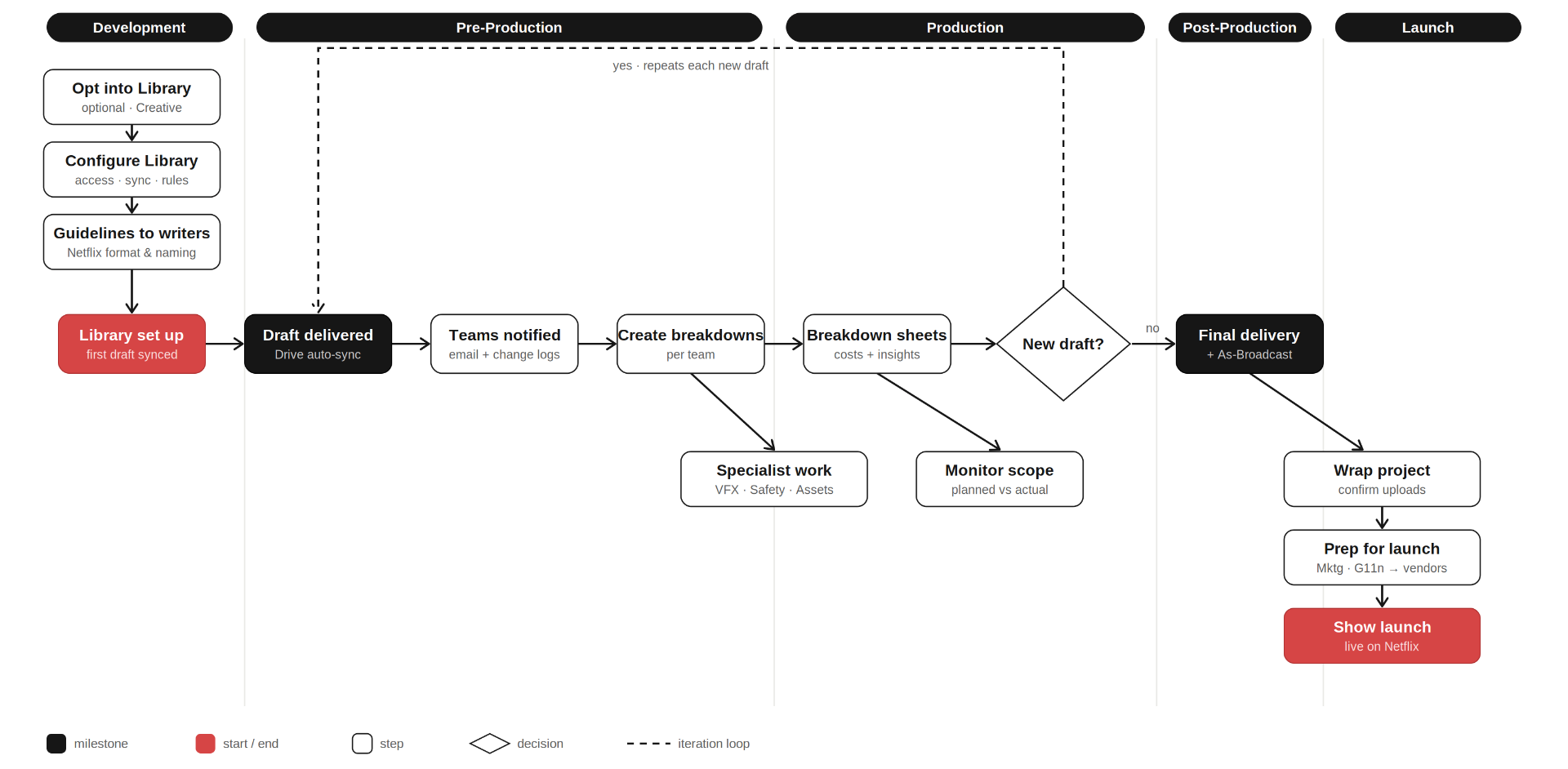
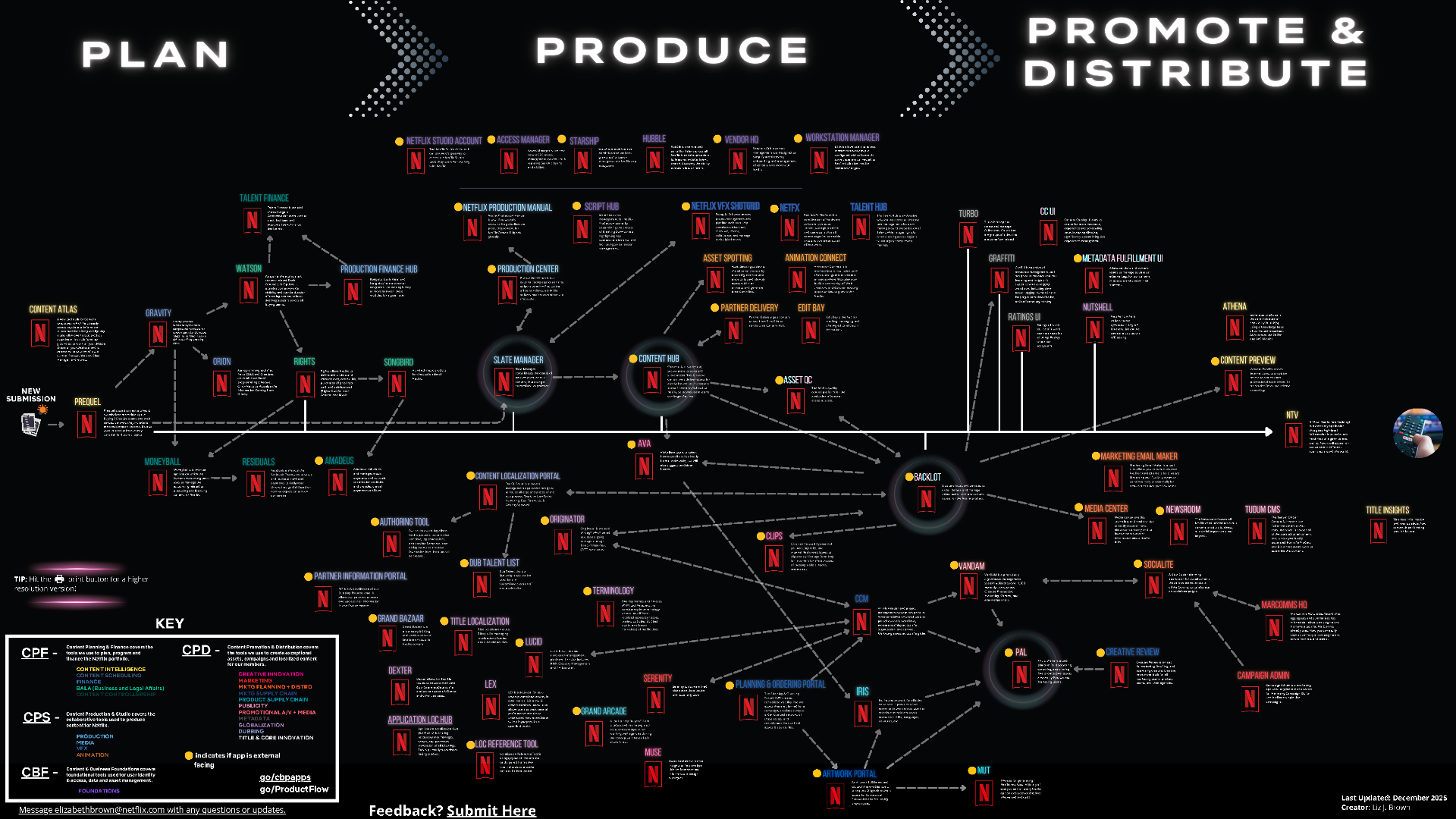
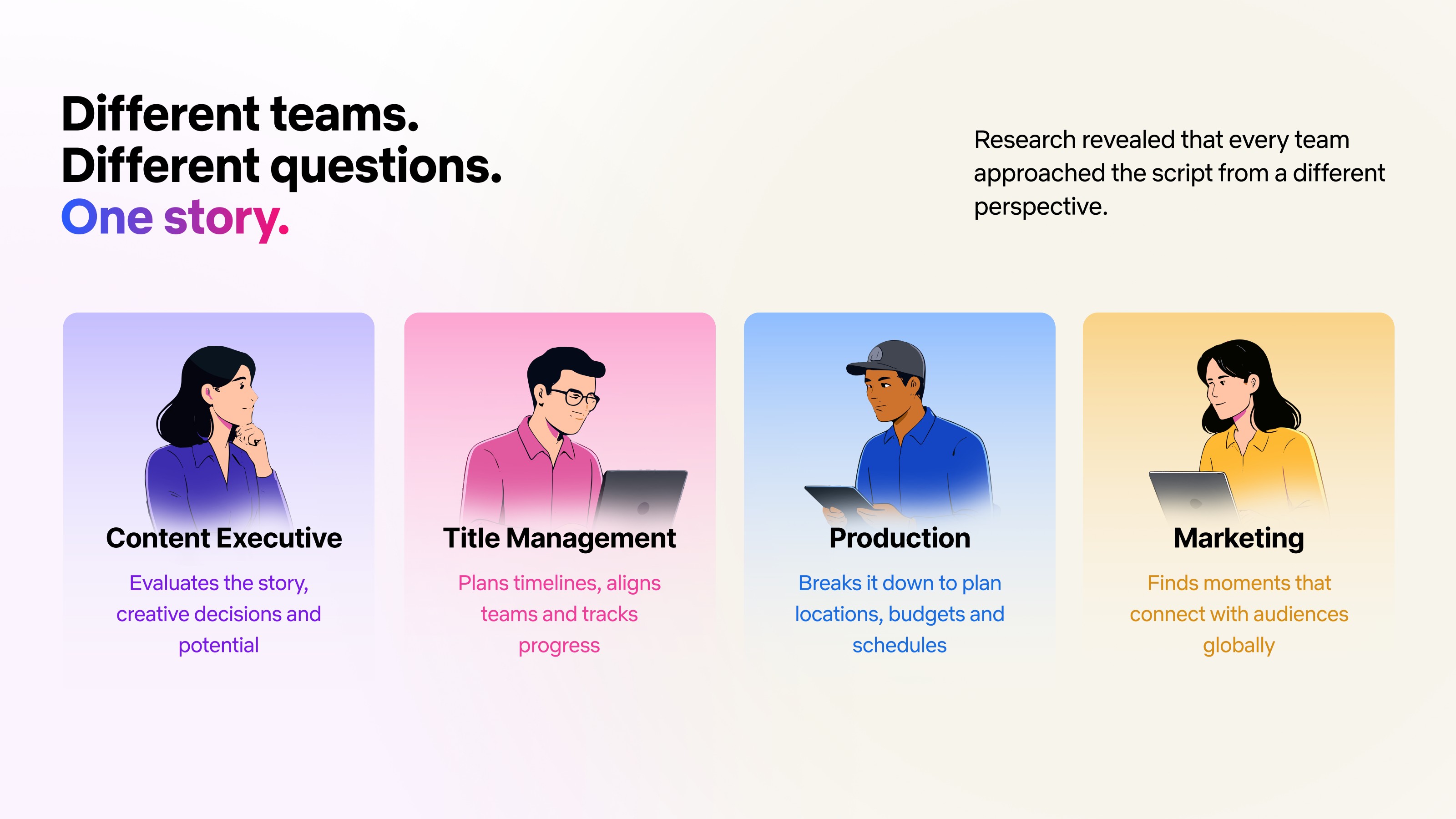
Eight partner orgs sit across a screenplay's life, some inside Netflix and some outside. Same document, four completely different jobs, four completely different pains.
They greenlight, take notes across drafts, and track the slate.
reconstructing why prior decisions were made every time a new draft lands.
They pull budgets, schedules, locations, and shots straight from the script.
manually tracing how a rewrite ripples through every downstream plan.
Trailers, key art, campaigns, 30+ language releases, all from the same source.
rebuilding story context from scratch, alone, on tight windows.
The authors.
watching AI tools explain their story back to them, without preserving intent or citing evidence.
This isn't a productivity feature. It's a bet on the operating layer under every title Netflix ships. The hardest cost isn't indecision. It's timing. In live-action, feedback lands in post, after the shoot, and fixes mean reshoots. Animation solved this long ago: see it, change it, before you shoot it. Generative AI finally makes that same loop possible for live action. Beyond that, four business stakes turn this into a company-level investment.
Every week saved on coverage and alignment is a week earlier a title gets greenlit and slotted. Speed compounds across the slate.
Miscommunicated intent between writers, producers, and directors is the biggest source of expensive late-stage rework. Shared understanding kills the surprise.
Marketing and 30+ localization teams start from the same source on day one: faster, more accurate campaigns and global launches.
Post-WGA, no studio can afford AI that talks over creators. Respect the author, preserve the evidence, and you become the platform talent actually wants to work with.
I spent my first months shadowing every team that touched a screenplay, and one pattern showed up on day one: Everyone opened the script. Then everyone left it. Execs jumped to Slack and meeting notes to reconstruct old decisions. Production pivoted to spreadsheets to trace budget ripples. Marketing copied scenes into campaign docs. Localization rebuilt context from scratch, in isolation. One screenplay, four totally different jobs, and every hop out of it bled context on the way back in. The script held the story. The org kept rebuilding the understanding around it, over and over.
The industry was converging on the same pattern: open a chat, write a prompt, get an answer. So I chased it too. Paper sketches. FigJam maps. Mid-fi frames. Floating sidebars, persistent chat, autonomous agents, cross-library global search. Most of it worked, technically. It also felt like AI bolted onto a script viewer, not a workspace built around how creative teams actually think together. I kept going anyway. It took an outside voice to name what was missing.
I took the early concepts to our EMEA creative partners expecting usability notes. The prototypes were polished. The AI was impressive. Instead, one sentence stopped the room. "I don't want AI telling me what my story means." That sentence reframed the whole project. The script was not the destination. Shared understanding was. Months before engineering started, I built a working, intelligent prototype in code so leadership could use the future instead of squinting at a deck. Not a polished deliverable. A thinking tool. It aligned the team, shaped the roadmap, and secured Story Hub's place in Netflix's Media 2030 vision.
Reading was not the bottleneck. Shared understanding was. We stopped asking how to make screenplay reading better and started asking how to help creative teams build shared understanding around stories. Four principles fell out of that shift, and became the spine for everything Story Hub would become.
One script, four completely different jobs. Respect that, do not flatten it.
The information already exists. The org just keeps rebuilding it, meeting after meeting. That is the waste.
Every artifact, every conversation, every AI response stays tethered to the exact line it came from.
The team stays the author. AI surfaces evidence, expands possibilities, preserves context. Humans still choose.
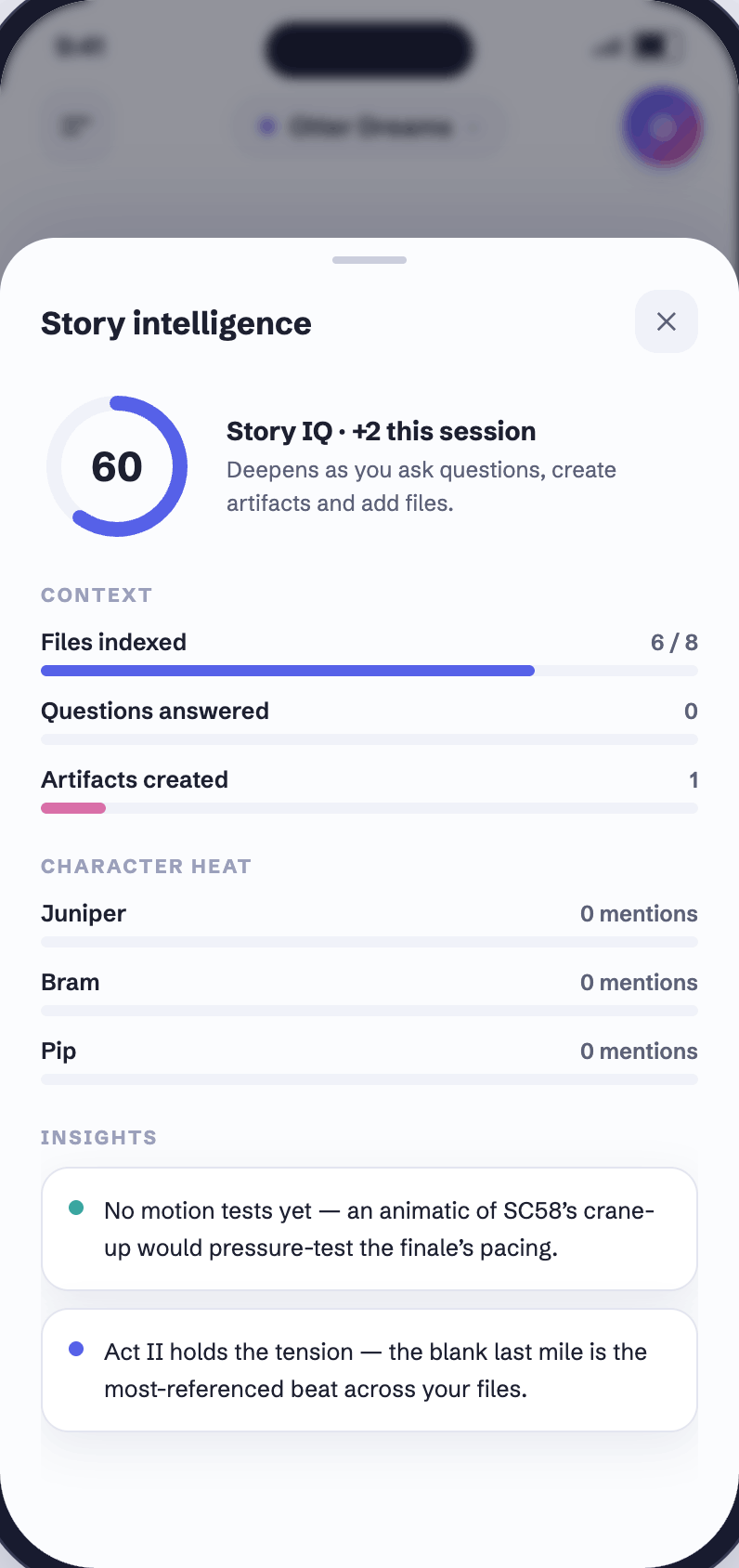
Story Hub could not lead with generation. Teams needed shared understanding of the story first. So we built the understanding layer. Every screenplay gets turned into a structured representation of the people, places, relationships, and narrative structure inside it. AI can reason about the story, not just search the text. Four capabilities sit on top.
Ask the screenplay anything. Chat inherits the script you're in, so nobody re-explains what they're already looking at. Every answer cites the exact line it came from.
One tap turns a 120-page script into a grounded synopsis, themes, and beats, so any exec can walk into a room already caught up, with citations back to the page.
Cast, locations, props, and scene requirements pulled from the script automatically, so production stops rebuilding the same spreadsheet every draft.
Characters, arcs, and relationships surface as a live map beside the page. Click any node, the reader jumps to the exact scenes it came from.
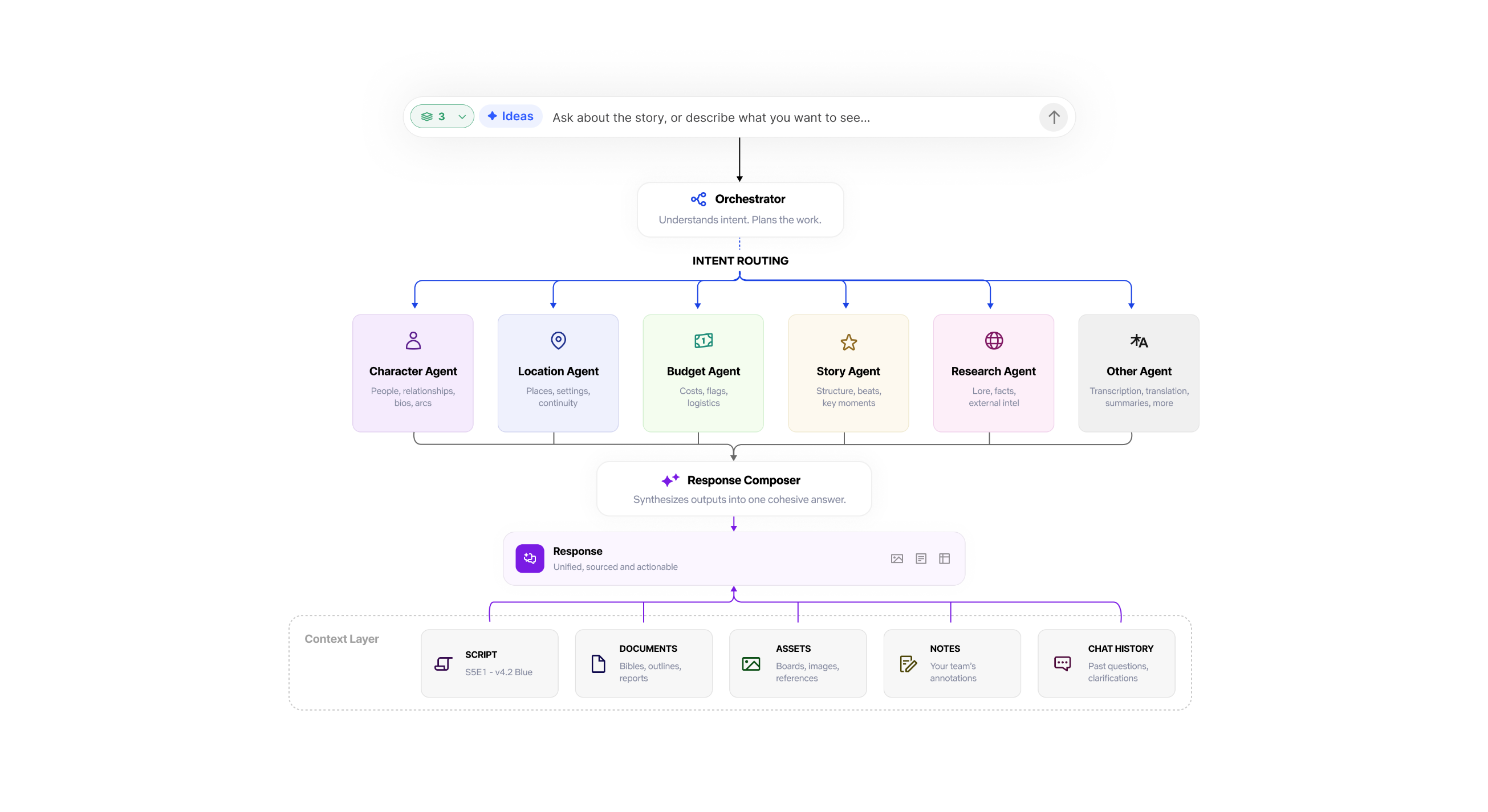
Underneath everything is one idea: the right agent shows up for the right job, automatically. You ask something, and an orchestrator reads what you actually want, routes it to whichever specialists it needs. Character, location, budget, story structure, research. Each does its piece, and then a composer stitches it all back into one clean answer. And every one of those agents is drawing from the same shared context: the script, the docs, the assets, your team's notes, the chat history. The point of all this machinery is that you never see any of it. You ask a question, you get one good answer. This is the difference between a real system and a pile of AI features bolted onto a file browser.
The AI is only useful if the app around it respects the people using it. Story Hub picks you up where you left off, treats a production like a living thing, and refuses to look like a spreadsheet, because the people opening it are storytellers.
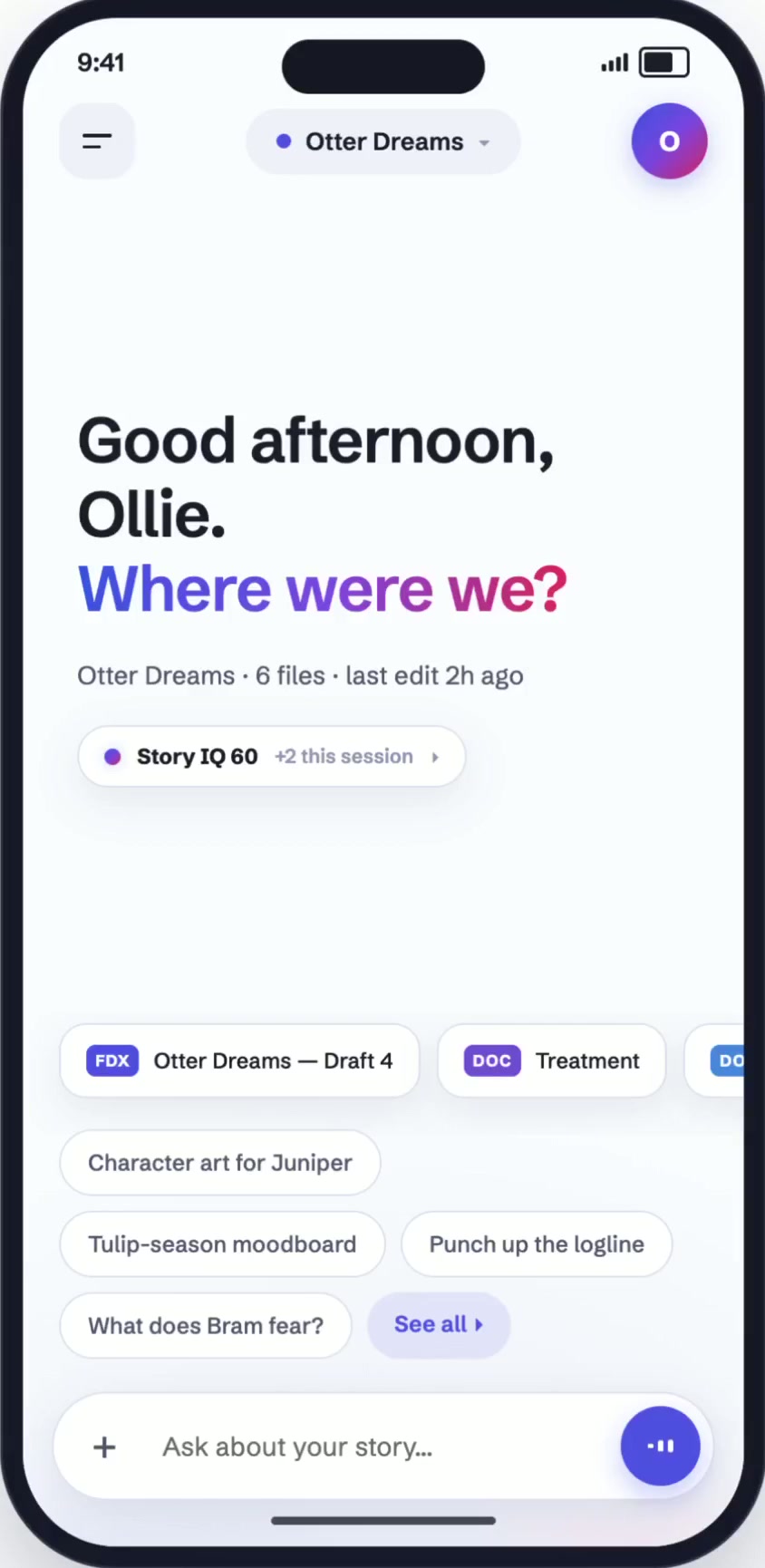
Home, Productions, Assets, and Team are the backbone. Open the app and it already knows what you were in the middle of. No folder hunt, no cold start.
Status, showrunner, writers' room, launch target, locked scripts, who's active right now. A production stops being a folder of files and becomes a page you actually collaborate on.
Storytellers open this: execs, artists, showrunners. So a production announces itself with full-bleed key art, not a gray table row. It's identity, not a file. It feels like the show.
Story Hub, on the go.
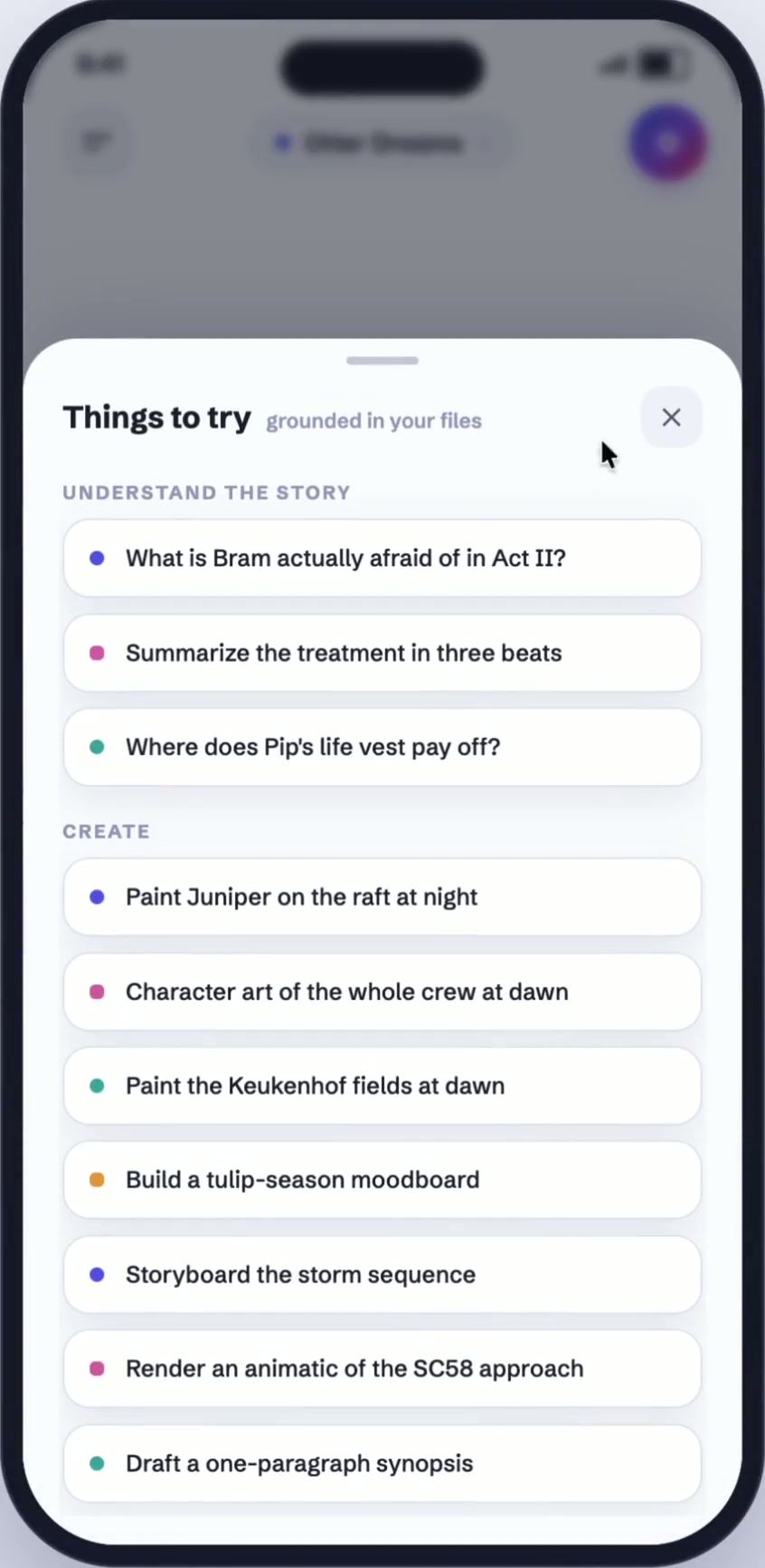
Desktop for exploration. iPad for immersion. Mobile for continuity. The screenplay stays constant, only the interaction changes. The same source-grounded workspace, sized for the ten minutes between meetings.
A closer look
Tap through the moments that make Story Hub feel less like a tool and more like a second brain on set.
One workspace, whole story
Drop in scripts, treatments, shot lists, budgets and lookbooks. Story Hub indexes it all, so every answer starts from your pages, not the internet.
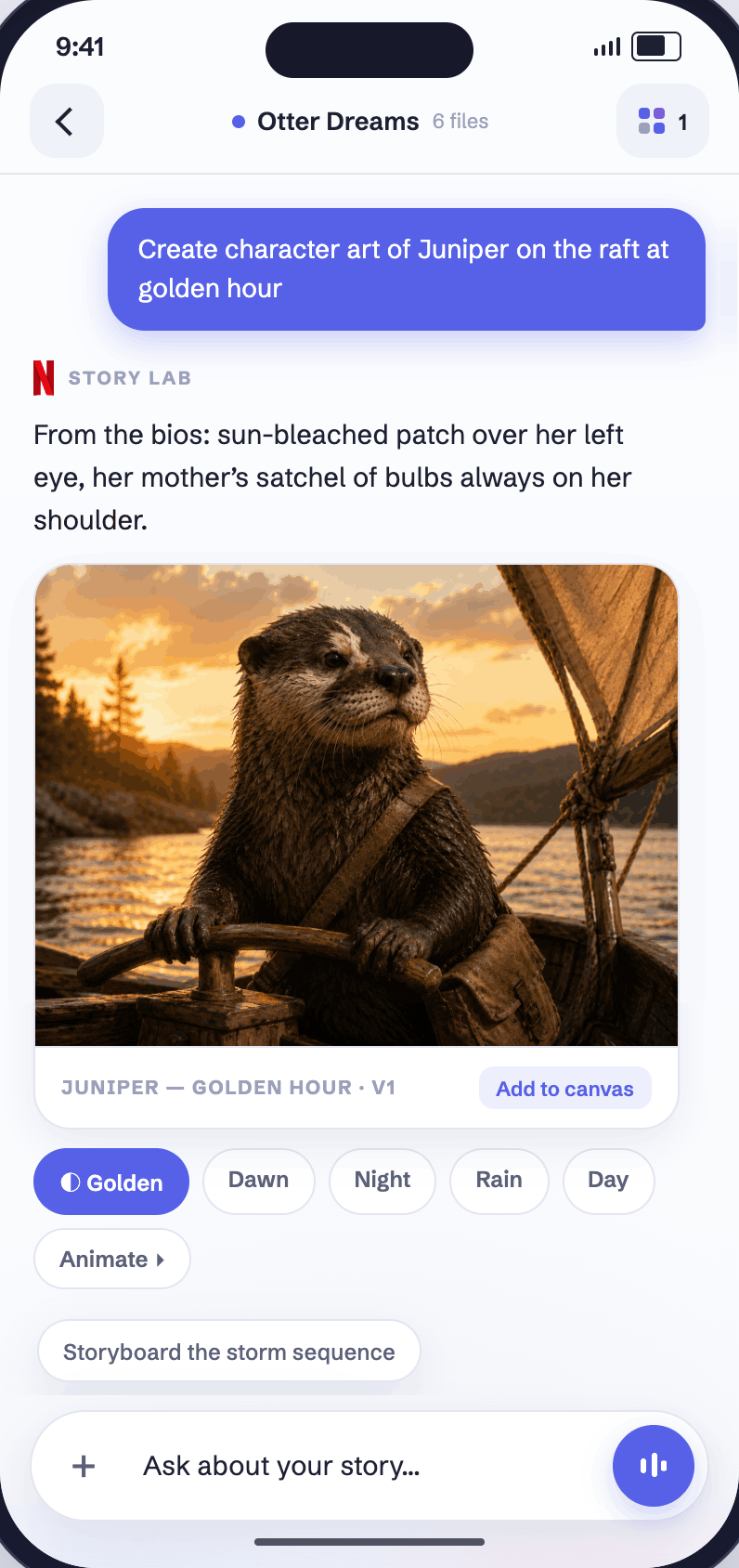
Once teams shared understanding, we could ask a bigger question: what if AI helped them imagine what the story could become? The trap was obvious. One prompt, one output, and the moment that one output exists, the room converges on it and the creative conversation dies. So Story Hub never generates just one answer, and never asks you to prompt-and-wait. Every output is a set of screenplay-grounded interpretations you can directly manipulate, blend, and branch. Generation becomes the start of a conversation, not the end of one.
Multiple screenplay-grounded interpretations of every character, moodboard, and scene. Then direct manipulation instead of repeated prompting. Generation becomes the beginning of a conversation, not the end of one.
The real insight: Story Hub shouldn't always be a place you go. Sometimes it should just be there, inside the tools people already have open. I'm actively working with several teams across Netflix to make that real. Same story intelligence. It just travels to where the work already happens, instead of asking everyone to come to it.
In-context · 01
Where a planning team already lives. Story signals surface right next to the production schedule, so a scheduling decision is made with the script in the room, not two tabs away.
In-context · 02
Where editors watch dailies. Script context overlays directly onto the footage timeline, so you see what a scene was meant to do while you're watching what it became.
Alongside what shipped, I mocked up a set of future concepts to pressure-test the vision and give leadership something tangible to argue with. Structural analysis. Production breakdowns. Notes influence. Key-scene animatics. Character bios. Not commitments. Concepts. Concrete enough to fight about.
A few years inside this problem left me with a stance, not a list of tips. This is the POV I bring into every AI product conversation now.
The industry keeps optimizing the generation step. The leverage is upstream. If a team does not share context, cannot preserve history, and cannot inspect evidence, no model output will feel like anything but noise. Sequence understanding first, then generation either gets much more useful, or turns out to be unnecessary. Either answer is a win.
Trust in AI is not earned by better prose or a confidence score. It is earned by making the reasoning inspectable at the exact grain the user thinks in. For creative work, that is the line of the script. I design the citation first now, and the answer around it. Where does the evidence live in the UI? That is the first question on every AI surface I touch.
The line between tool and co-author is where creative products live or die. AI can compare, retrieve, summarize, and interpret. It does not get to put words on the page without consent, and it does not get to train on the creator's work without permission. Cross that line and the people who make the work walk away. I have watched it happen.
Screens get redesigned. Models get swapped. The primitives, how AI is invoked, how it grounds, how it fails, how it hands back to the human, those persist. It is the layer where a staff designer earns their keep, and it is the layer I want to keep working at.
The most influential artifacts on this project never shipped. A working code prototype. An exec demo. A cross-org workshop. Getting eight orgs to agree on one source of truth was a design problem, and the deliverable was a working artifact, not a deck.